
How to Search for a Warrant in Marion County
Marion County and the sheriff publish contact routes, not a public county warrant-search tool. When the issuing agency is unclear, start with the sheriff dispatch office. A Circuit or General Sessions case points to the Justice Center court contacts. A city citation belongs with that city's municipal clerk.
- Read the citation, notice, or court letter and note its court and case number.
- Call dispatch for routing if you cannot identify the office.
- Call the court clerk and ask for current process status, the next date, and any amount or appearance condition.
- Use the jail number for custody or bond questions if the person is already booked.
- Request an existing public record from its office if a phone answer is not enough.
Before you call the Marion County clerk, gather a name, date of birth, an approximate date, and any case paper. Save 911 for emergencies, not a routine self-check.
No Marion County Warrant Portal Was Found
The Marion County Sheriff's Department posts contact, dispatch, corrections, and policy pages, but none of them carries a searchable warrant list, an active roster, or an online citation lookup. Its official site is still worth a visit for routing and current contact details. It simply does not expose NCIC entries. On the court side, the Marion County court page works as a contact directory rather than a search interface. It names the Circuit and General Sessions offices you need when your paper points to a county case. An empty website search box can suggest a tool that Marion County does not actually offer, so treat the phone chain as the real starting point. The clerk who answers can tell you what exists and what a website never will.

Confirm which Marion County clerk holds the file before you drive over; the directory posts no warrant counter schedule.
Marion County Warrant Search Fields
No Marion County web form offers search fields, so there is no set of required online inputs. Use the case or citation number when you call the clerk. Share personal details only through the official office, and only when they are needed to tell records apart.
| Field | Public form | What to do |
|---|---|---|
| Last or first name | Not exposed | Ask the official clerk what helps identify the file |
| Date of birth | Not exposed | Provide only to an official office if requested |
| Warrant or case number | Not exposed | Read the number from the court paper |
| Issuing court | Not exposed | Name the city or county court in the call |
| Status or bond | Not exposed | Ask the clerk or sheriff which record they can confirm |
Marion County publishes no “search” button or online result schema for warrants.
Marion County Appellate Search Cannot Check Warrants
Tennessee's Public Case History system is official, but it belongs to the appellate world. Its fields cover case number, case style, party name, and business or organization, and it searches Supreme Court and appellate cases only. It does not reach Marion County General Sessions, city dockets, or ordinary Circuit Court warrant records. The state's own instructions spell out that scope. A result there can help someone who already has an appellate case. A no-hit says nothing reliable about a local warrant, so do not treat silence there as an all-clear. Read the Public Case History instructions before using the search.
For a Marion County trial-court question, skip the appellate system and call the local clerk. The C-Track search interface shows the appellate fields.
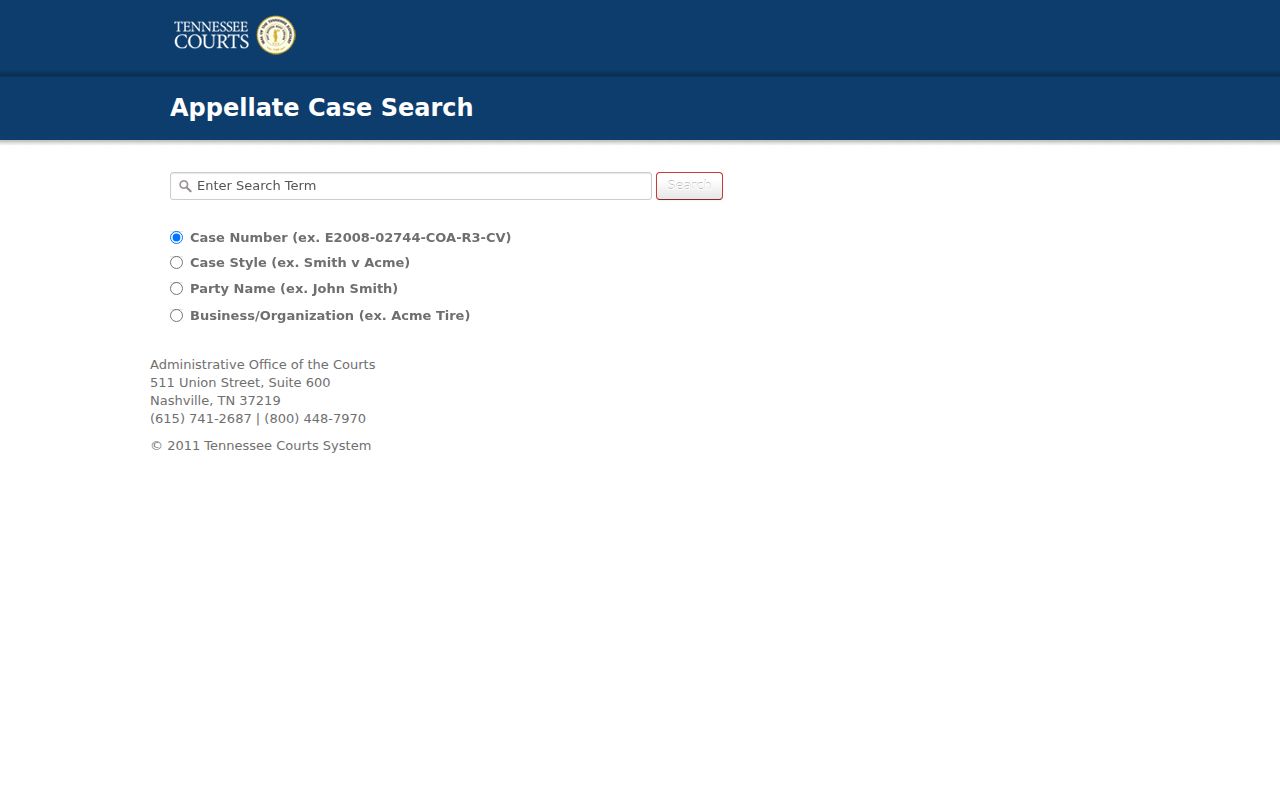
Those fields are not a county warrant lookup.
Marion County Warrant Search Results Have Limited Fields
Because Marion County publishes no public warrant listing, no sample result exists to walk through. When a clerk confirms a record, ask which court issued it. Ask what process number appears, and whether the status carries a date. A city number can differ from a county case number.
| Issuing court | Identifies the court that controls the process |
|---|---|
| Process number | Warrant, capias, summons, or citation identifier |
| Reason | Offense, missed appearance, or other order stated in the file |
| Bond or appearance | Amount, type, or court condition if recorded |
| Status date | When the office last entered a service or court action |
A status like served, recalled, or cleared does not by itself close the underlying Marion County case. Ask what remains due or still scheduled.
Marion County Warrant Status Terms Need Clerk Confirmation
Status words mean little without the office behind them. "Active" or "outstanding" usually means a process has not been recorded as served or withdrawn. "Served" can describe law-enforcement action while the case still waits in court. "Recalled" and "quashed" describe court action. Marion County publishes no local status-code table, so ask the office for the meaning and the date of any entry. Keep the issuing court beside the term, because a city docket, a Circuit capias, a sheriff service record, and a Driver Services compliance entry can each show a different stage of the same matter. Tennessee Supreme Court Rule 34 governs access to court records and explains why a record may be limited. Sealed and confidential files follow their own limits.
Where Marion County Warrants Are Checked
In Marion County, different offices answer different parts of a warrant question. Dispatch handles routing and law-enforcement coordination, while the issuing clerk explains court status and the next hearing. The jail answers custody and bond questions. City clerks hold their town's ordinance and traffic docket, and Tennessee offers no single public statewide warrant search.
| Question | Official route | Scope |
|---|---|---|
| Unknown issuing office | Sheriff dispatch | Routing and service questions |
| Circuit or General Sessions file | Justice Center clerk | County court docket |
| City citation or ordinance case | Issuing city clerk | Municipal docket |
| Custody or release question | Jail/corrections | Booking and bond process |
Ask the office that controls the stage you need confirmed.
A Focused Marion County Warrant Request Names the Court
If a call does not produce the record, ask the likely holder how to submit a Tennessee Public Records Act request for an existing, bounded file. Marion County's planning and building page directs readers to the Mayor's Office for request forms. A city docket request goes to that city's clerk. Name the record type, the court, a case number or date range, and whether you want inspection or a copy. Jasper's public-record policy gives a local example of request fields, delivery choices, and copy charges; those are Jasper city terms, not a Marion sheriff fee schedule, and the Jasper request form is linked for that distinction. A written request can help locate an existing entry. It cannot create a new warrant database or recall the process.
Marion County Warrant Search Access and Restricted Records
Tennessee opens its court files to inspection under Rule 34, unless a statute, another rule, a protective order, or a sealing order closes the door. Juvenile records follow their own confidentiality rules. Even public access reaches no NCIC entry. A Marion County record could sit redacted, sealed, or in another office entirely. The rule page spells out those boundaries rather than offering any county warrant lookup. For a specific file, ask the clerk whether it is public, redacted, or held elsewhere.
For general county record access, see the Marion County warrant records access summary.
A No-Hit Marion County Warrant Search Shows No Clearance
A blank result proves little. The query may have hit the wrong court, an appellate file, or a custody list instead of an actual warrant record, and it can miss fresh changes or restricted material. When you know the Marion County court involved, take the no-hit result to the issuing clerk and get that office's answer. If a warrant was recalled, ask for written proof. Also ask when the sheriff or Driver Services record will catch up. The active warrants page explains why a missing public list can never settle a warrant's status.